In short:
I joined an AI-first software company where customer interviews, roadmap, product vision, research, and prototypes are available to coding agents through MCP. This post follows one accounting feature from customer evidence to low-fi and high-fi prototypes, planning, implementation, and multi-agent code review.
Faster implementation moved the bottleneck toward domain knowledge, attention, review, and making sure lessons end up somewhere the next agent can actually find them.
Note: I’ve kept the high-level workflow intact, but changed or generalized some product and company details. Screenshots were edited to remove proprietary information.
I joined this company in 2026 after more than two decades of building software. I knew they used AI in a structured way throughout the development process, so I expected my workflow to change. I did not expect so much of my day-to-day work to change with it.
The codebase is a TypeScript monorepo of about 380,000 lines, with Nuxt on Cloudflare Workers, Postgres on Neon, and Inngest for background jobs.
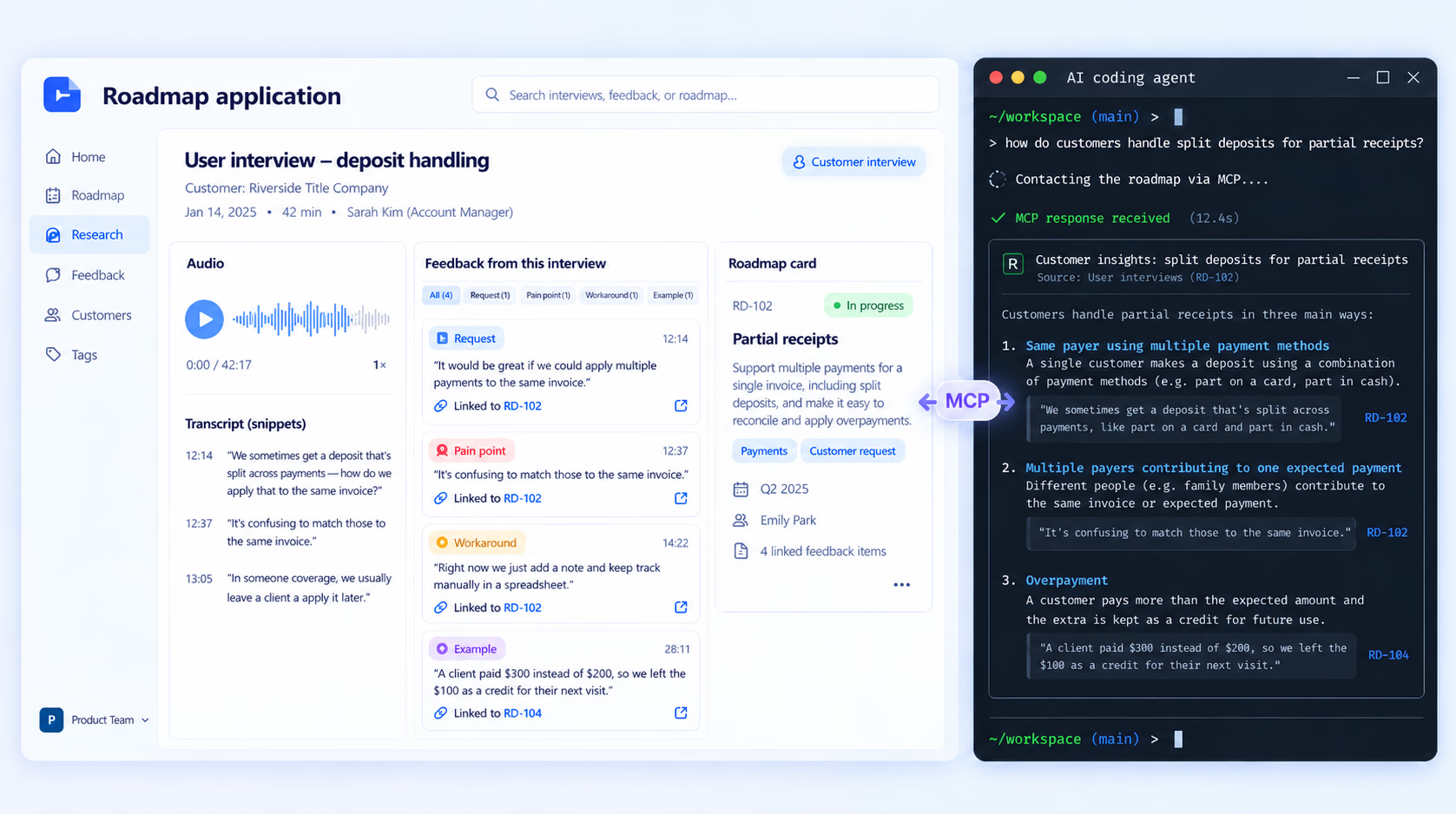
Most of my work starts by discussing feature intent with an agent connected to what we call the product brain:
The product brain is not LLM memory or an autonomous product manager. It is the product context we want agents to be able to retrieve: user interview transcripts, individual pieces of customer feedback, roadmap cards, product vision, research pages, prototypes, and the decisions attached to them.
That context is not just stored for people to browse. The roadmap application exposes it through MCP, so an agent working on a feature can search the same customer evidence and product direction I would use to make a decision.
My own role crosses the usual product and engineering boundary. I spent 18 years as a full-time software developer, then shifted my focus toward product management in 2019, though I’ve continued to code and stay close to implementation.
In practice, I might begin with a customer interview, ask an agent to search previous conversations for related cases, work through a few interface options, review a prototype, turn that into a plan, and then have an agent implement it. Other agents review the implementation. I still test it, question it, change the plan, and occasionally find out that something which worked perfectly on my laptop is broken in production.
That workflow is easier to explain with a real feature.
This post follows a piece of work from customer conversations through design, planning, implementation, code review, and production. Along the way, it shows what working in an AI-first software company currently looks like for me, including the parts that work well and the parts that still require a human paying close attention.
The accounting problem
The software is a multitenant application for title companies (the firms that hold money during a real-estate closing in the US).
A buyer wires in their deposit. A lender funds the loan. The title company pays the seller, agents, county, contractors, and everyone else involved in the transaction.
Our ledger records those movements. It does not move the money itself. A person at the bank does that, and the ledger has to agree with what the bank says happened.
That makes partial receipts more than a UI problem.
If the ledger expects a $5,000 deposit and receives $4,000 by wire and $1,000 by check, both transactions need to reconcile against the same expected receipt without counting any money twice.
Customer context the agent can query
Every user interview call goes into our roadmap application: transcript, audio, and individual pieces of customer feedback.
An entry might be a request, pain point, workaround, or concrete example. It is quoted from the customer and linked to the relevant roadmap card.
The roadmap application exposes this information through MCP, so a coding agent can query it.
For partial receipts, I asked how customers handled split deposits.
The agent searched previous interviews and returned three recurring cases:
- the same payer using multiple payment methods
- multiple payers contributing to one expected payment
- overpayment
It also estimated that partial payments appeared in roughly one in eight files and linked each claim back to the source conversation.
That research became a page attached to the feature.
The same setup helps with smaller design questions. While working on another ledger feature, I asked how title companies handled fees that were not present on the closing statement.
Across 25 transcripts, the agent found an example where the statement showed $10,245 payable to a listing agent, but the title company issued two checks: $10,000 to the brokerage and $245 directly to a painter the agent had agreed to pay from the commission.
That fact later became an automated test case in the software.
Why we built the roadmap
Before I joined, the team had used Linear, Slack threads, and GitHub issues.
They were all adequate for tracking work. The problem was customer evidence.
A ticket can tell you what someone wants built. It usually does not preserve who asked for it, their exact words, related examples from other customers, prototypes, and the history of how the proposed solution changed.
Linear could store transcripts, and its MCP server would make them searchable by an agent. The team wanted a different data model: one session per call, individual quoted entries, cards those entries roll up into, and tools for merging or splitting cards as the understanding changes.
The same roadmap application also became the place where we publish research pages and prototypes.
Owning it has costs. We have hit context limits from oversized tool responses, had agents download entire transcripts because the right search tool did not exist yet, and moved some documentation elsewhere after hitting hosting limits.
In July we also trialled Dovetail. Its transcript search was good and answers linked back to moments in recorded calls. It would also have introduced another place separate from the prototypes and comments already living in the roadmap.
We kept the internal tool.
Design before implementation
With the customer cases available, the agent generated a low-fidelity page containing four approaches to posting a partial receipt.
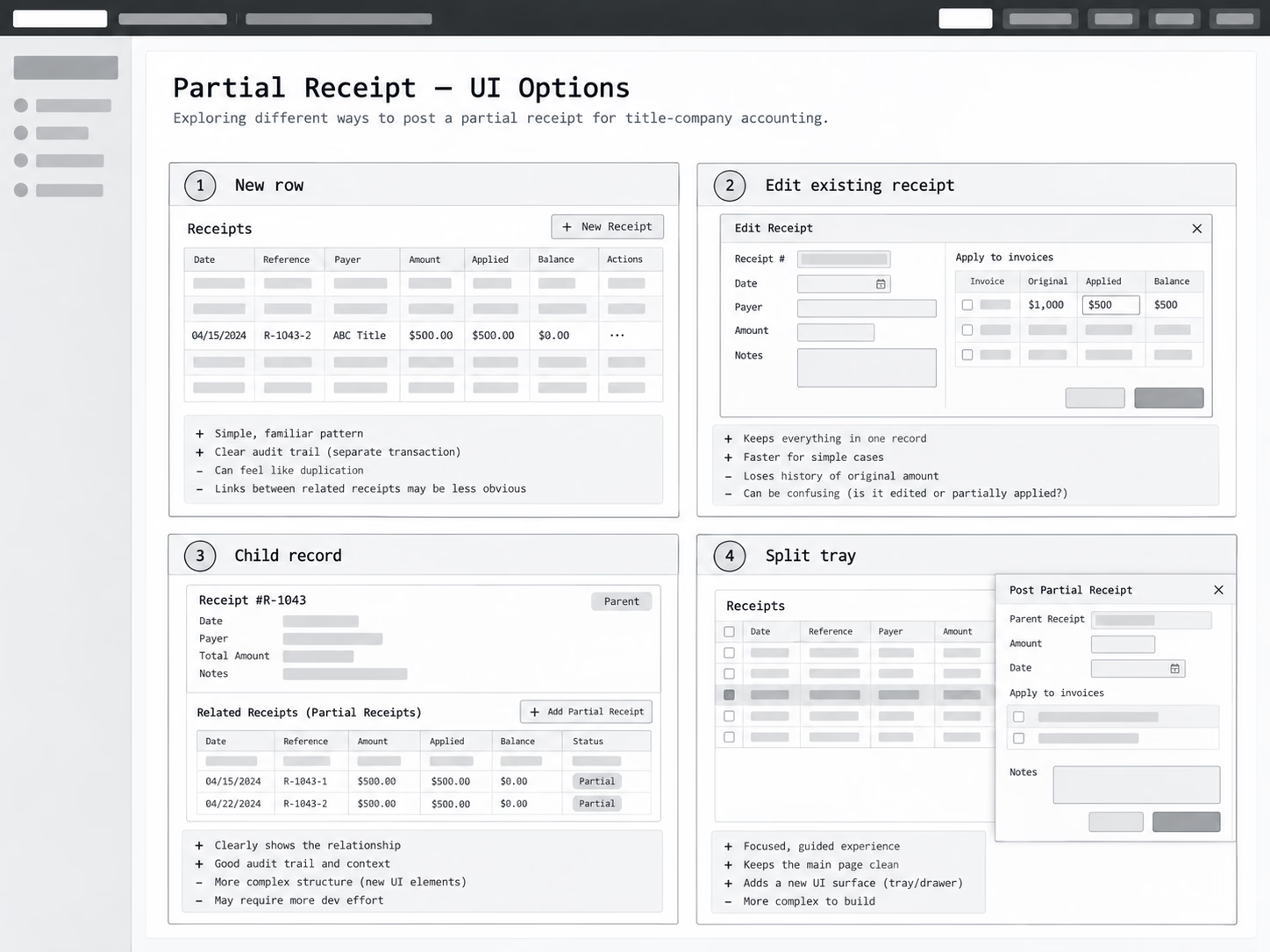
The rejected versions stayed on the page with notes explaining why we did not choose them.
The point of the low-fidelity stage is to settle structure before spending time on visual details.
Is a partial receipt a new row? An edit to the existing receipt? A child record?
Once we agreed on the interaction, the agent built a high-fidelity prototype as a single HTML file. It used the production application’s design tokens, fake network latency, a simulated bank feed, and a reset control.
This wasn’t a static Figma-style prototype. The HTML page implemented enough of the interaction and accounting state to behave like the feature: you could post instalments, simulate the bank feed, watch the ledger totals change, and reset the scenario.
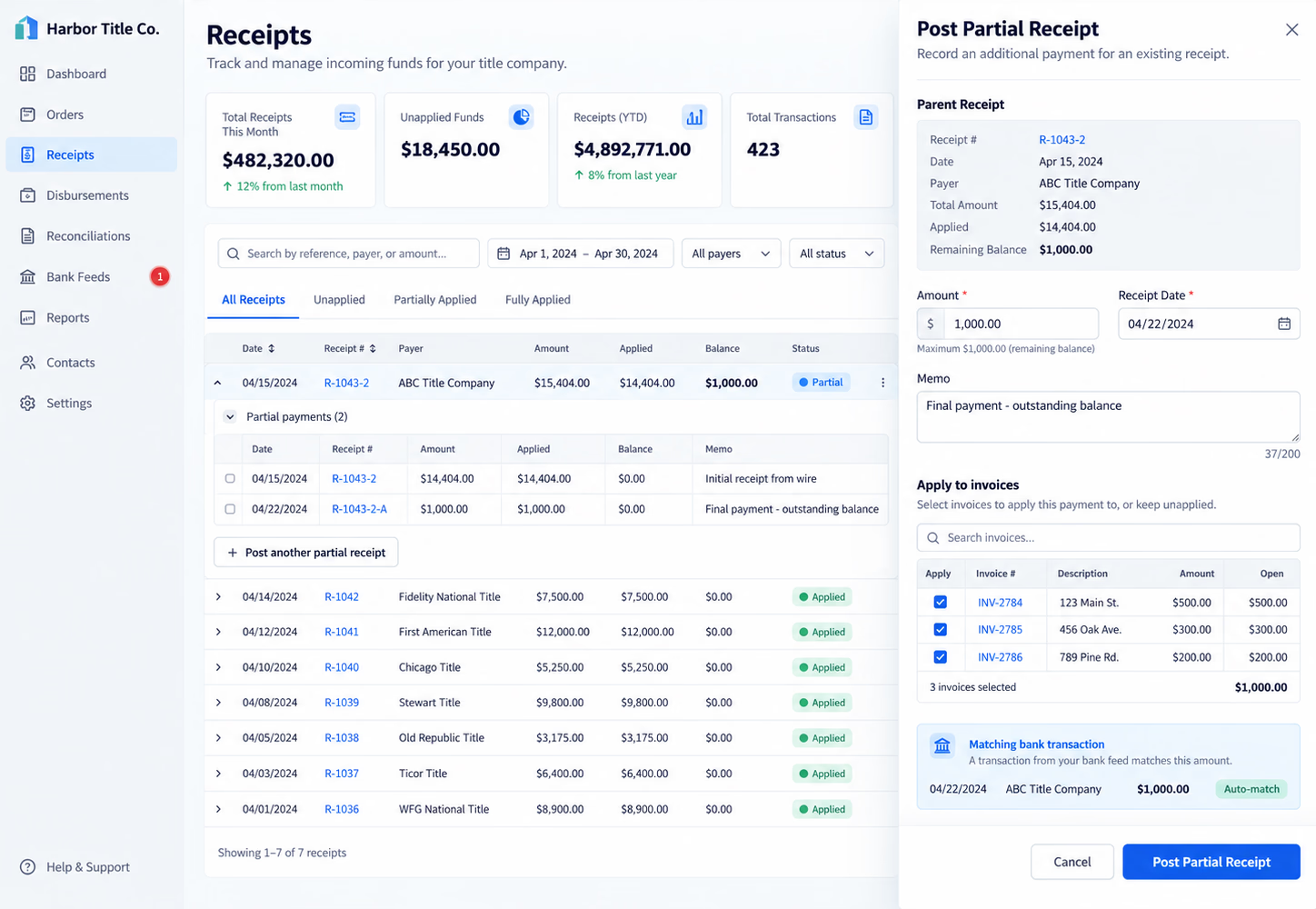
Posting a $15,404 receipt in instalments made one flaw in the model visible: the same money could be counted twice.
We hadn’t touched the production database or written a migration yet. Once the expected behaviour was clear, that scenario became an automated test for the implementation.
Feedback with pins
Every prototype and HTML plan we produce includes an annotation overlay.
Click an element, type a comment, and copy the result for the agent. The copied Markdown contains the selected element, its position, and the feedback.
The same annotations work after a prototype is published to the roadmap, so design partners can comment directly on the interface.
The useful part is not the annotation UI itself. It is that feedback arrives back at the coding agent with a concrete target instead of a sentence like:
The thing on the right should probably not be there.
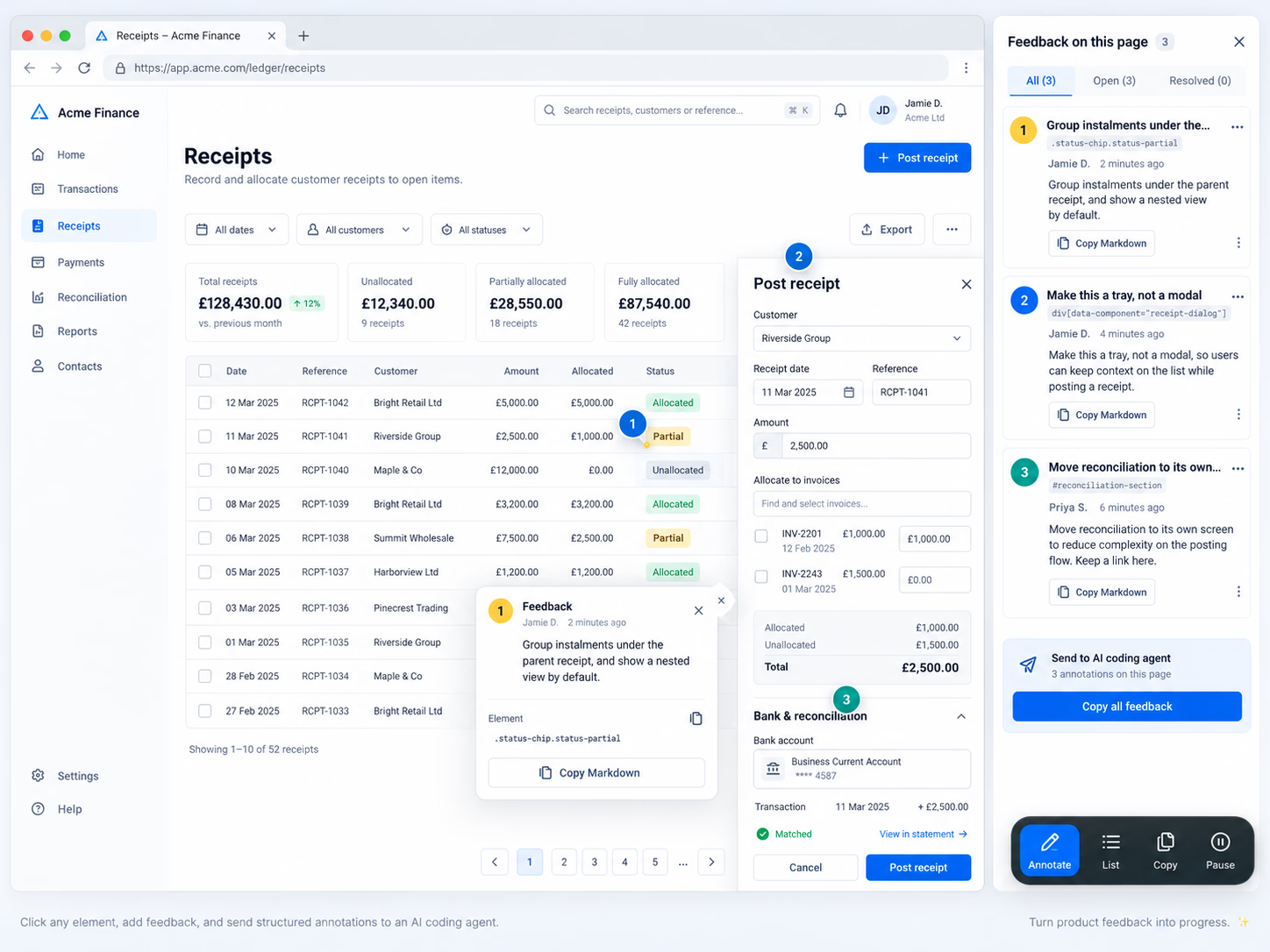
Several public tools follow similar patterns. Agentation provides element selection and structured feedback. React Grab can capture component and source information from selected elements.
A related ledger feature went through five rounds of this process.
Across those rounds we removed standalone entries, moved reconciliation to its own screen, and replaced a modal with a tray.
One plan for requirements and implementation
We use the compound-engineering plugin with Claude Code.
Its brainstorm and planning commands produce one document per feature containing scenarios, requirements, scope, Definition of Done, and the implementation approach.
Keeping requirements and implementation in the same document does not prevent them from diverging, but it makes the divergence easier to spot.
For partial receipts, the plan had five implementation units:
- the service method that carves an instalment from a receipt
- the API route
- the posting tray
- the ledger grid
- a summary test
Then the agent implemented it.
| Time, Sep 11 | Step |
|---|---|
| 09:15 | High-fidelity prototype validated |
| 11:24 | Plan written |
| 12:02 | Service and API route implemented |
| 12:27 | Grid, tray and summary test complete; lint and type checks clean |
| 12:35 | Four-reviewer code review started |
| 15:15 | Review findings closed |
The review runs four agents in parallel, each with a different brief: correctness, adversarial review, project standards, and performance.
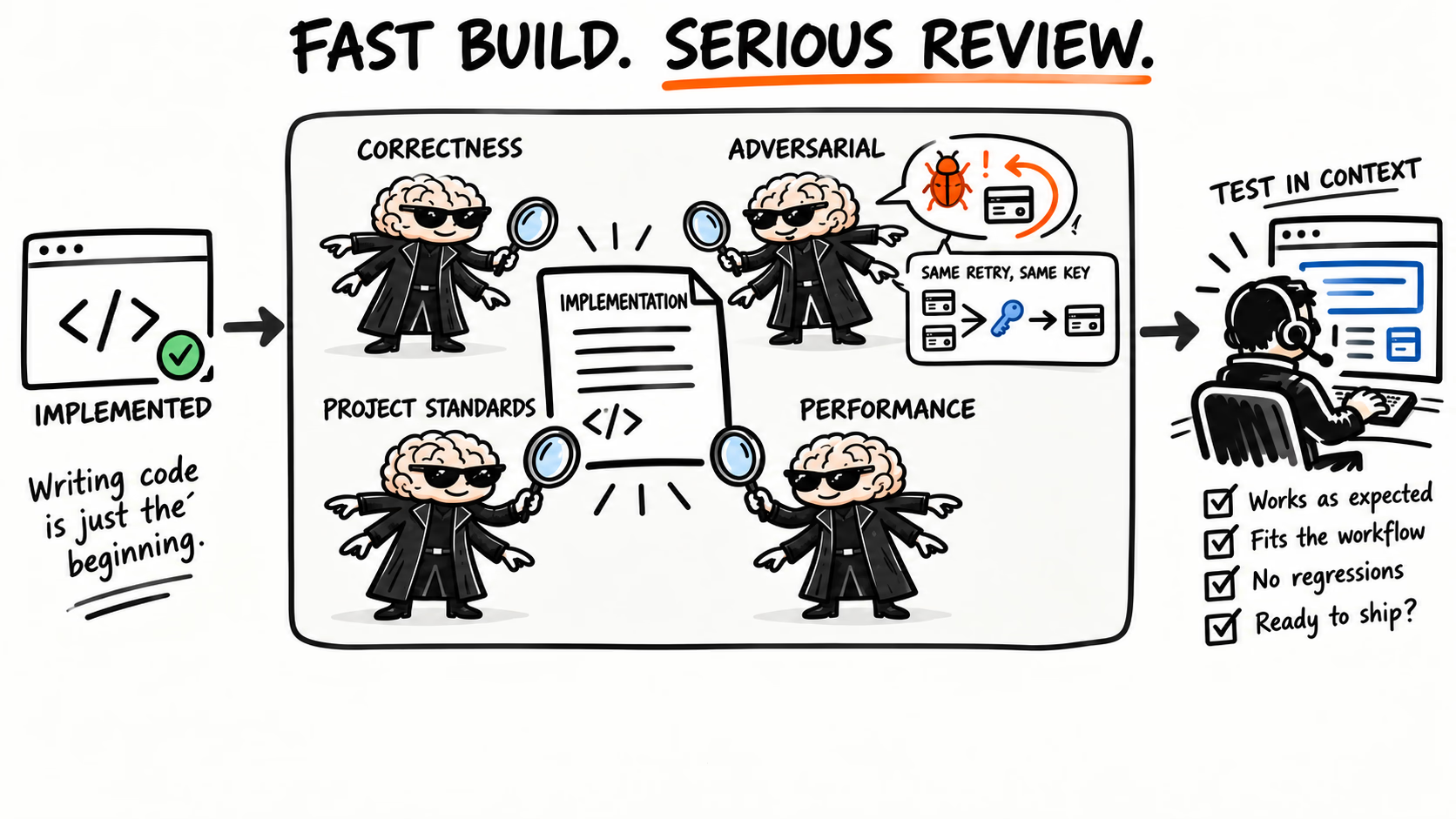
The adversarial review found two bugs worth fixing.
Retry keys
The adversarial review found a retry bug that could post the same money twice. Each posting attempt carried an idempotency key, but the key lived in component state and disappeared when the tray closed. If a request timed out after succeeding on the server, reopening the tray and trying again generated a new key, so the server could treat the retry as a new payment.
We moved the key to sessionStorage so an identical retry reuses the same identifier.
The same review found a second retry edge case around the final instalment, which became another service test.
Three months of agent-active time
The partial-receipts feature was not an outlier.
In three months I ran the compound-engineering commands a hundread times across about 30 features.
The recorded agent-active elapsed time was about 29.5 hours.
I calculate that from the command invocation to the agent’s last recorded step before my next message, using session history captured by the claude-mem plugin. Time spent waiting for me is excluded.
This is not total engineering time. It does not include customer interviews, my review time, manual testing, product decisions, or time spent discussing the work with colleagues.
| Step | Runs | Agent-active time | Typical run |
|---|---|---|---|
Build (ce-work) | 20 | 12.2 h | 26 min |
Code review (ce-code-review) | 28 | 10.0 h | 18 min |
Plan (ce-plan) | 33 | 4.8 h | 7 min |
| Brainstorm and ideate | 20 | 2.4 h | 5 min |
Planning is cheap compared with implementation and review. There is a lot of talk about writing the perfect plan, handing it to an agent, and getting back a finished feature. That has not been my experience.
The plan rarely survives contact with reality unchanged. New constraints appear, assumptions turn out to be wrong, and scenarios we did not anticipate need to be evaluated. The agent implements the first version of the plan; refinement happens when I review and interact with the raw result.
Review consumed almost as much recorded agent time as building.
The two longest features were also two that caused the most trouble.
Bank matching rework spent more than four hours in review and fixes.
Partial receipts took about an hour of recorded agent-active time.
Across the 29 features for which I grouped the data, 19 took less than an hour. Four took more than two hours.
That speed changes what becomes scarce.
Typing code is less of a constraint. Understanding the domain, checking assumptions, reviewing the output, and deciding what to do next take a larger share of my attention.
The domain was the onboarding bottleneck
None of this was how I worked when I joined.
I did not know the title industry, and I was entering a codebase largely written with agents, plus the instructions, skills, and plugins surrounding that workflow.
Two weeks in, I could navigate the codebase well enough, but I still lacked the domain knowledge to reason about some of the workflows.
A discussion about the order flow made that gap obvious. The code was accessible. The terminology and business rules were not. I did not yet know what a title commitment was, how it affected the order lifecycle, or which distinctions mattered to the people using the product.
That made domain understanding the main onboarding bottleneck.
I used the agent as a tutor.
I gave it a colleague’s workflow document and asked it to add the purpose, expected outcome, and an example for each step.
I had it produce a C4 diagram of the application architecture and later a one-page event storm with screenshots from the real application.

When learning bank reconciliation, I asked it to explain the workflow and let it drive the application in a visible browser.
The agent also generated realistic test data for areas I did not yet understand well enough to construct manually.
Seeding data from documents
For one purchase file I had it add to the app a $525,000 sale in Anne Arundel County, Maryland, with a $472,500 loan, a $10,000 deposit, and 32 money movements balancing to the cent, including state and county transfer taxes. That does not replace deterministic fixtures but it helps.
It gave me a realistic example to inspect while learning a new part of the product.
The agent finds references, not necessarily answers
The agent can search Slack, the roadmap, transcripts, and source code.
That does not make those sources complete.
After watching a customer’s accounting walkthrough, I posted three questions to the team and noted that the agent and I could not find answers in Slack or the roadmap.
My teammates would be looped in only when necessary, after exhausting all the information sources.
In another case I asked whether uploading a purchase agreement during order creation meant the contract was ratified.
The agent found several related transcript references, but the term was missing from our glossary.
A teammate answered the question in one sentence: the purchase agreement itself is the ratified contract. Our order has nothing to do with whether it is ratified.
The agent had references.
The teammate had the domain answer.
Those answers now belong in the glossary so the next agent can find them.
Works locally, broken in production
AI-assisted development does not remove environment-specific failures.
The first one, creating an order with an unverified address showed a generic “Server Error” in production instead of the expected “Create anyway” prompt.
It worked locally.
Nitro’s development error handler returned the error message and associated data. The production handler redacted anything that was not a real H3Error.
Our hand-built error therefore lost its data.code only in production.
Our Sentry configuration also did not record that 4xx response.
The resulting rule went into the instructions every agent session reads.
A lesson in the wrong place
The second incident involved moving ledger syncing into a background job.
It worked locally, but in production the job never fired and nobody could sync.
A review a few days earlier had already described this failure pattern: a side effect after the commit can fail silently if nothing retries or monitors it.
But that observation was still sitting in the review output. It had never been promoted into docs/solutions/, where our compound-engineering workflow looks for reusable lessons before planning new work.
So the next planning session did exactly what we had configured it to do. It searched the accumulated solutions and found nothing.
The problem was not that the agent failed to remember. We had failed to turn a review finding into project memory.
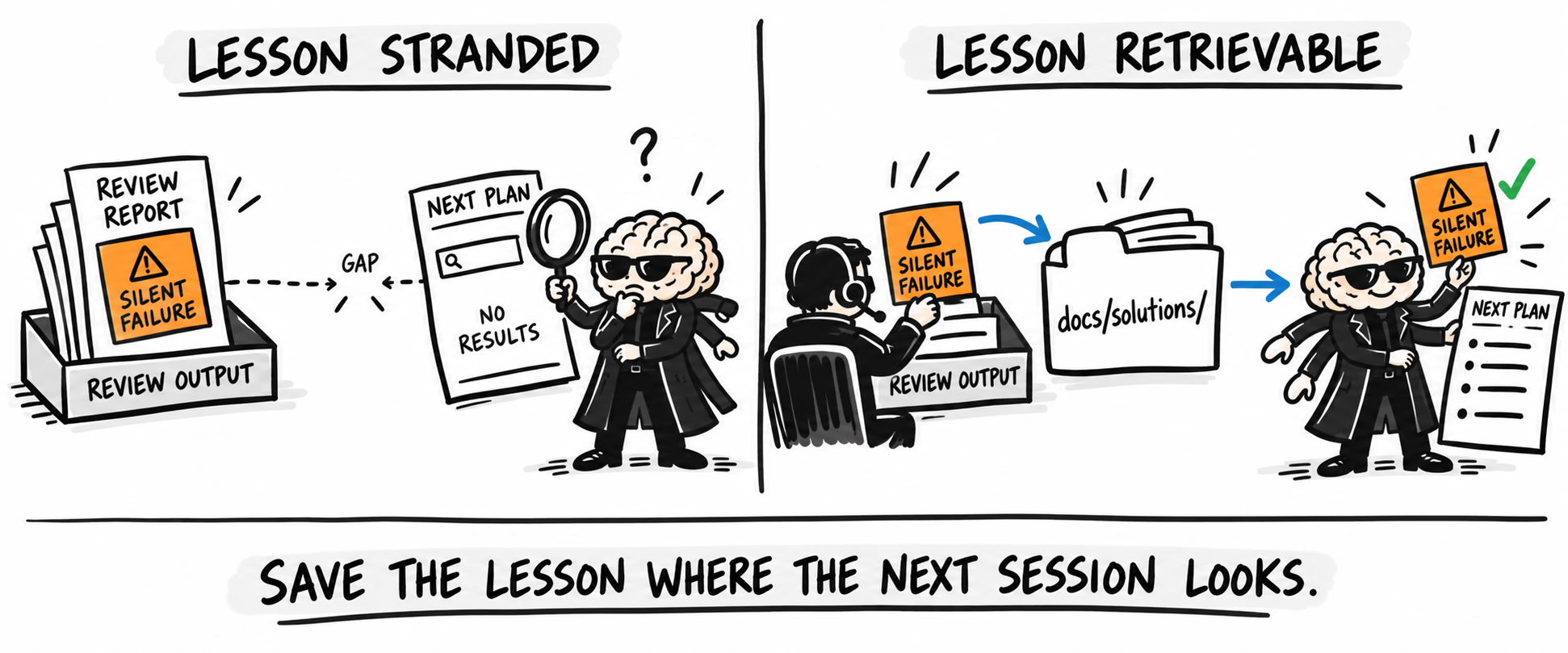
Compound engineering only compounds when useful observations make the jump from ephemeral output into the knowledge the next agent is expected to read.
Where the bottleneck moved
The tools make it cheap to start another piece of work while an agent is running.
I fell in to that trap.
Opening another worktree and starting a second feature sounds efficient until both agents need decisions, both produce review output, and both require enough product context to know whether what they built makes sense.
My own mental WIP limit did not increase because implementation got faster.
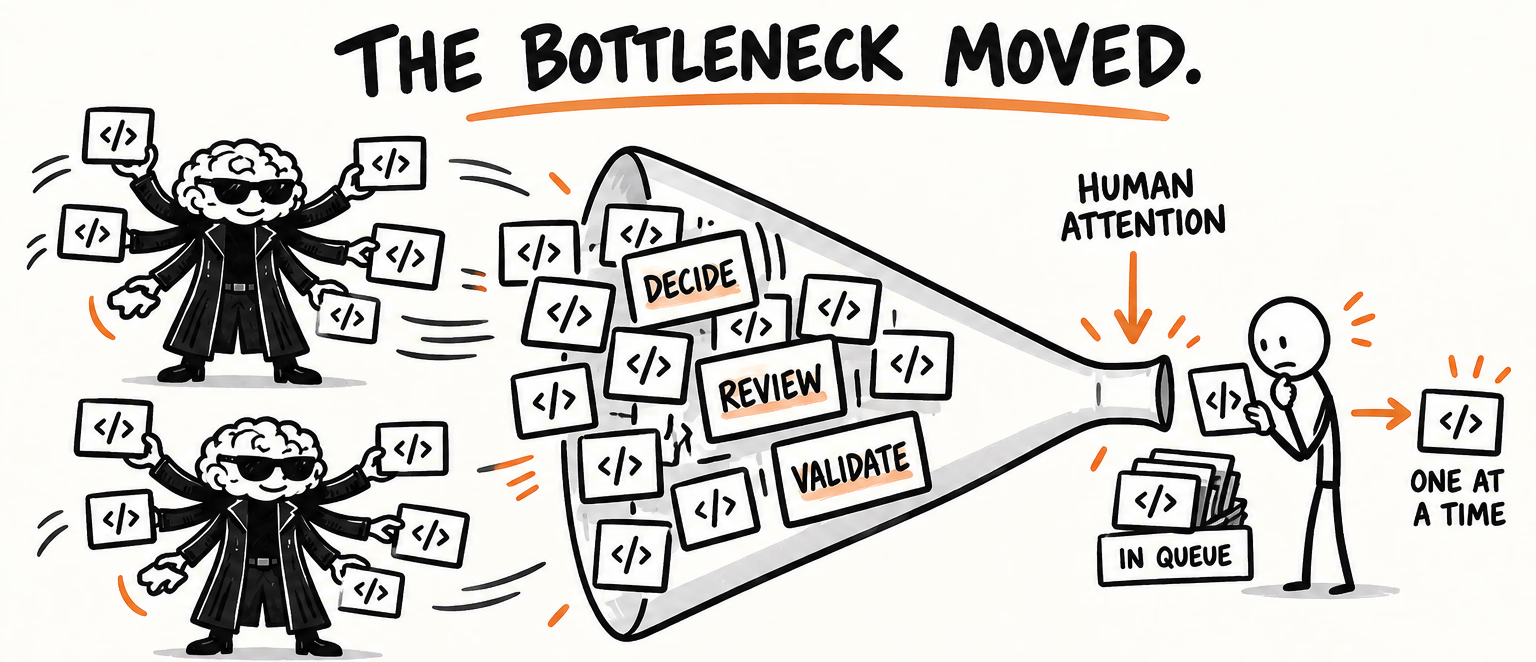
I have found it more useful to spend that parallel time on bounded work: exploring a mockup, checking a design, investigating a question, or distilling customer interviews.
Those tasks can improve the context of the next implementation without creating another stream of code that needs supervision.
That is probably the largest change in how I think about working in an AI-first team.
The scarce resource is no longer keystrokes.
It is attention.
What AI-first means to me now
I do not spend much time thinking about whether an agent can autonomously take a ticket and return a pull request.
That is not the interesting part of this workflow.
The useful part is having customer evidence, product decisions, designs, code, tests, runtime data, and previous lessons available to the same working environment.
A feature can move from a transcript to a prototype to an implementation much faster when those transitions do not require repeatedly reconstructing the context.
But the speed does not eliminate the need to understand the product.
It makes weak understanding more expensive because incorrect assumptions can become working software quickly.
It also makes review, domain knowledge, and documentation more important.
The partial-receipts feature took about an hour of recorded agent-active time. Its implementation still depended on customer examples, design choices, manual validation, an adversarial review, and somebody noticing whether the resulting behavior made sense for a title company.
The production incidents made the other side equally clear: a lesson that exists but cannot be retrieved might as well not exist.
The workflow compounds only when each piece of work leaves behind context the next person or agent can actually use.